How to Protect Wedding Photos Digitally for Good
Protecting your wedding photos digitally means creating multiple secure copies, choosing privacy-focused sharing platforms, and maintaining those copies over time. The industry standard for this is the 3-2-1 backup rule: three copies of your files, stored on two different media types, with one copy kept off-site. Couples who skip this step risk permanent loss when photographer gallery links expire, hard drives fail, or cloud services shut down without warning. The photos from your wedding day are irreplaceable. Treating their protection like a one-time task is the most common and costly mistake couples make.
How to protect wedding photos digitally with a solid backup system
The 3-2-1 backup method is the most reliable framework for securing wedding images long-term. It gives you three layers of protection so that no single failure wipes out everything. Professional photographers and archivists use this same standard for their own work.
Here is what each layer looks like in practice:
Copy 1: Your primary working copy. Store all original files on your home computer or a dedicated external hard drive. Use a clear folder structure, such as organizing by date, event, and photographer name, so files stay accessible years from now.
Copy 2: A second local copy on different media. A portable rugged SSD is the best choice here. Rugged SSDs cost $50–$80 for consumer models and resist drops, moisture, and temperature changes better than standard drives. Keep this copy at a family member’s home or in a fireproof safe.
Copy 3: An off-site cloud backup. Cloud storage protects against physical threats like fire or theft that would destroy both local copies at once. Services like Backblaze and IDrive provide automated cloud backup for $9–$89 per year. That cost is trivial compared to the value of what you are protecting.
One detail most couples miss: RAID configurations are not backups. RAID keeps data available if one drive fails, but it does not protect against theft, fire, or accidental deletion. You still need off-site copies.
Pro Tip: Hard drives that sit unused for years can silently fail. Schedule a health check and migrate your data to fresh media every 3–5 years to keep your archive readable.
Folder organization matters more than most couples expect. A structure like 2025_Wedding > Ceremony > Reception > Portraits takes five minutes to set up and saves hours of searching a decade later. Name files consistently, and never delete the originals from your camera cards until all three backup copies are confirmed.
What tools and services best secure wedding images online?
The right tools depend on whether you need long-term archival storage, guest photo collection, or private sharing with family. Each category serves a different purpose, and using only one leaves gaps.
Cloud storage for originals is the backbone of any digital photo security plan. The key requirement is storing files in their original quality. Compressed upload options sacrifice metadata and fine detail, which matters when you print large-format images years later. Always choose “original quality” or “full resolution” settings, never “storage saver.”

Guest photo collection platforms let friends and family upload their own candid shots from your wedding day. These platforms vary significantly in how long they keep your files. Free tiers typically retain photos for only 30–90 days, while paid plans at $49–$89 per year offer unlimited, full-resolution storage. Treat free tiers as temporary collection tools, not permanent archives.
Privacy-focused sharing platforms add controls that social media cannot match. Password-protected galleries let you share photos with specific guests without making them publicly searchable. Photo moderation features let you approve which guest uploads appear in the album. Hidden gallery modes let you keep the album private until you are ready to share it as a reveal.
Storage category | Best for | Key limitation |
Cloud archival (paid) | Long-term original storage | Requires ongoing subscription |
Rugged external SSD | Off-site physical backup | Manual updates required |
Guest collection platform | Gathering candid guest photos | Free tiers expire in 30–90 days |
Password-protected gallery | Private sharing with family | Not a backup solution |
Consumer cloud storage | Everyday access and sync | Compression risk if not set correctly |
For couples who have a large photo library and slow internet speeds, “cloud seeding” is worth knowing about. This technique involves shipping a physical drive to a cloud provider, who then uploads your files directly. It bypasses the weeks-long upload process that large RAW photo collections can require.
Step-by-step plan to download, backup, and share your photos safely
Follow these steps as soon as your photographer delivers your gallery. Speed matters because gallery links are temporary delivery tools, not permanent archives. Free gallery retention often ends after 30–90 days.
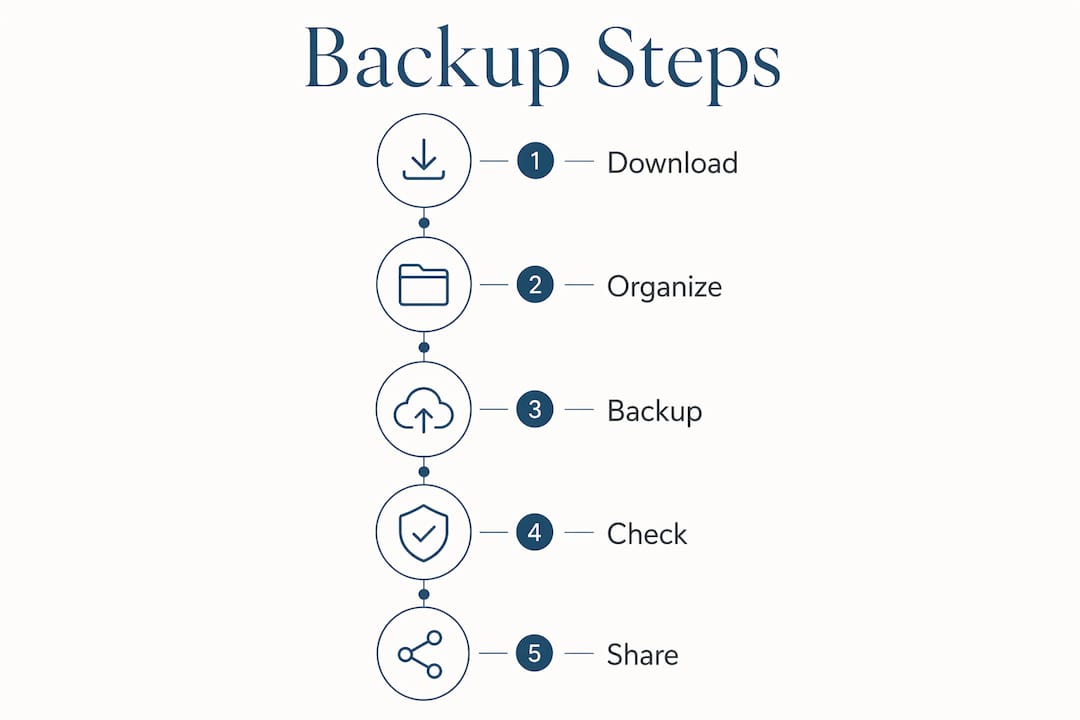
Download all originals immediately. Do not wait. Open your photographer’s delivery link and download every file at full resolution. Save them to your primary computer first.
Verify the download is complete. Open a sample of files from each folder. Confirm they open correctly and match the file count your photographer provided.
Copy files to your rugged SSD. This becomes your second local copy. Store this drive somewhere other than your home if possible.
Upload originals to your cloud backup service. Set the upload to original quality. Let it run overnight if needed. Confirm the upload completes before moving on.
Create a private sharing gallery for family. Use a password-protected platform to share selected photos with parents and close family. Send the password separately from the link.
Avoid posting original files to social media. Social platforms compress images automatically and strip metadata. Share lower-resolution exports for social posts, and keep originals in your private archive.
Delete camera cards only after all three backup copies are confirmed. This is the step most couples rush. Verify first, then format.
Pro Tip: Before you format any memory card or delete files from a device, open your cloud backup dashboard and confirm the file count matches what you uploaded. One miscount can mean permanent loss.
For creative wedding shots that took extra planning, consider keeping a separate labeled folder so those specific images are easy to find when you want to print or frame them.
Common mistakes that put your wedding photos at risk
Most couples lose photos not from a single dramatic event but from a slow accumulation of small oversights. Knowing the pitfalls makes them easy to avoid.
Treating the photographer’s gallery as a permanent archive. Photographer galleries expire, and couples who rely on them as their only copy lose everything when the link goes dead. Download your files the day you receive them.
Skipping physical backups. Cloud storage alone is not enough. If your subscription lapses or the service shuts down, you need a local copy to fall back on.
Uploading compressed versions. Choosing “storage saver” settings on consumer cloud platforms reduces file size by discarding detail. This is invisible until you try to print a large canvas and the image looks soft.
Sharing original files publicly on social media. Public posts make your photos searchable and downloadable by anyone. They also strip the EXIF metadata that records the date, camera settings, and location of each shot.
Never checking backup health. A drive can appear fine and still be failing. Run a disk health check with a tool like CrystalDiskInfo (Windows) or Disk Utility (Mac) once a year.
“The biggest risk to wedding photos is not a hard drive crash. It is the couple who downloads the gallery once, stores it in one place, and assumes the job is done. Redundancy is the only real protection.”
If you do experience accidental deletion, stop writing new data to the affected drive immediately. Data recovery software like Recuva or Disk Drill can often recover recently deleted files if the storage space has not been overwritten. Act fast and do not panic.
Key takeaways
Protecting wedding photos for life requires three independent copies, original-quality uploads, and privacy-controlled sharing from the moment you receive your gallery.
Point | Details |
Apply the 3-2-1 rule | Keep three copies on two media types, with one stored off-site. |
Download originals immediately | Photographer gallery links expire in as little as 30 days. |
Always upload at full resolution | Compressed uploads lose metadata and print quality permanently. |
Use password-protected galleries for sharing | Private links keep your photos off public social feeds. |
Refresh storage media every 3–5 years | Unused drives fail silently; regular migration prevents data loss. |
Why I think most couples underestimate what “backed up” really means
Couples come to me after the wedding excited about their photos, and the first thing I ask is: “Where are your backups?” The answer is almost always “the cloud” or “my laptop.” That is one copy. One copy is not a backup. It is a single point of failure.
The 3-2-1 rule sounds technical, but it is really just common sense applied to something irreplaceable. You would not keep your only copy of a legal document in one drawer. Your wedding photos deserve the same thinking. I have seen couples lose entire galleries because a subscription lapsed, a laptop was stolen, or a hard drive failed after sitting in a closet for four years.
Privacy is the other piece that gets ignored. Posting full-resolution originals to social media feels harmless, but it hands control of your images to a platform that compresses, stores, and uses them under its own terms. A password-protected gallery takes five minutes to set up and keeps your photos exactly where you want them.
The couples who do this right treat digital protection as an ongoing practice, not a one-time download. They set calendar reminders to check drive health. They refresh their cloud subscriptions. They keep a second physical copy somewhere outside their home. That discipline is what separates couples who still have their wedding photos in twenty years from those who do not. For sunset portraits and other technically demanding shots that required perfect timing and light, losing those files to a preventable failure is genuinely heartbreaking. Do not let that happen.
— Kellie
Pixelgroves delivers photos you will want to protect forever
[
Pixelgroves, winner of the 2025 Best of Florida Wedding Photographer Award, builds secure photo delivery into every package from the start. Every couple receives their full-resolution gallery through a private, organized delivery system designed for easy downloading and long-term archiving. Pixelgroves photographers shoot with professional-grade workflows, including dual memory card redundancy from the moment of capture, so your originals are protected before they even reach you. Explore wedding photography packages that include professional digital delivery, or browse photography styles to find the approach that fits your wedding day.
FAQ
How long do wedding photographer galleries stay active?
Free gallery links typically expire within 30–90 days. Download all original files immediately after receiving your gallery link to avoid permanent loss.
What is the 3-2-1 backup rule for wedding photos?
The 3-2-1 rule means keeping three copies of your photos on two different types of media, with one copy stored off-site. This protects against hardware failure, theft, and natural disasters simultaneously.
Is it safe to share wedding photos on social media?
Sharing full-resolution originals on social media is not safe for preservation. Platforms compress images, strip metadata, and make files publicly accessible. Share lower-resolution exports socially and keep originals in a private archive.
How often should I check my wedding photo backups?
Run a drive health check once a year and migrate your data to fresh storage media every 3–5 years. Unused drives can fail silently without any visible warning signs.
What is the best way to share wedding photos privately with family?
Use a password-protected gallery platform that supports photo moderation and hidden galleries. Send the password separately from the link, and avoid posting the gallery URL publicly.
Recommended
Comments